
Ask PelQi about your business
Updated 21 October 2026
PelQi is the assistant inside Fountain. Ask it about your workspace the way you would ask a colleague: who still owes you, what is coming up this week, or how a client is doing. It reads only your workspace's records, writes drafts for you, and asks before anything changes.
Availability Every plan: Starter and Growth, for every role. Deals and the pipeline need Growth.
Steps
- On any page in the app, choose Ask PelQi to open the chat. To give it the whole screen, open PelQi from the menu.
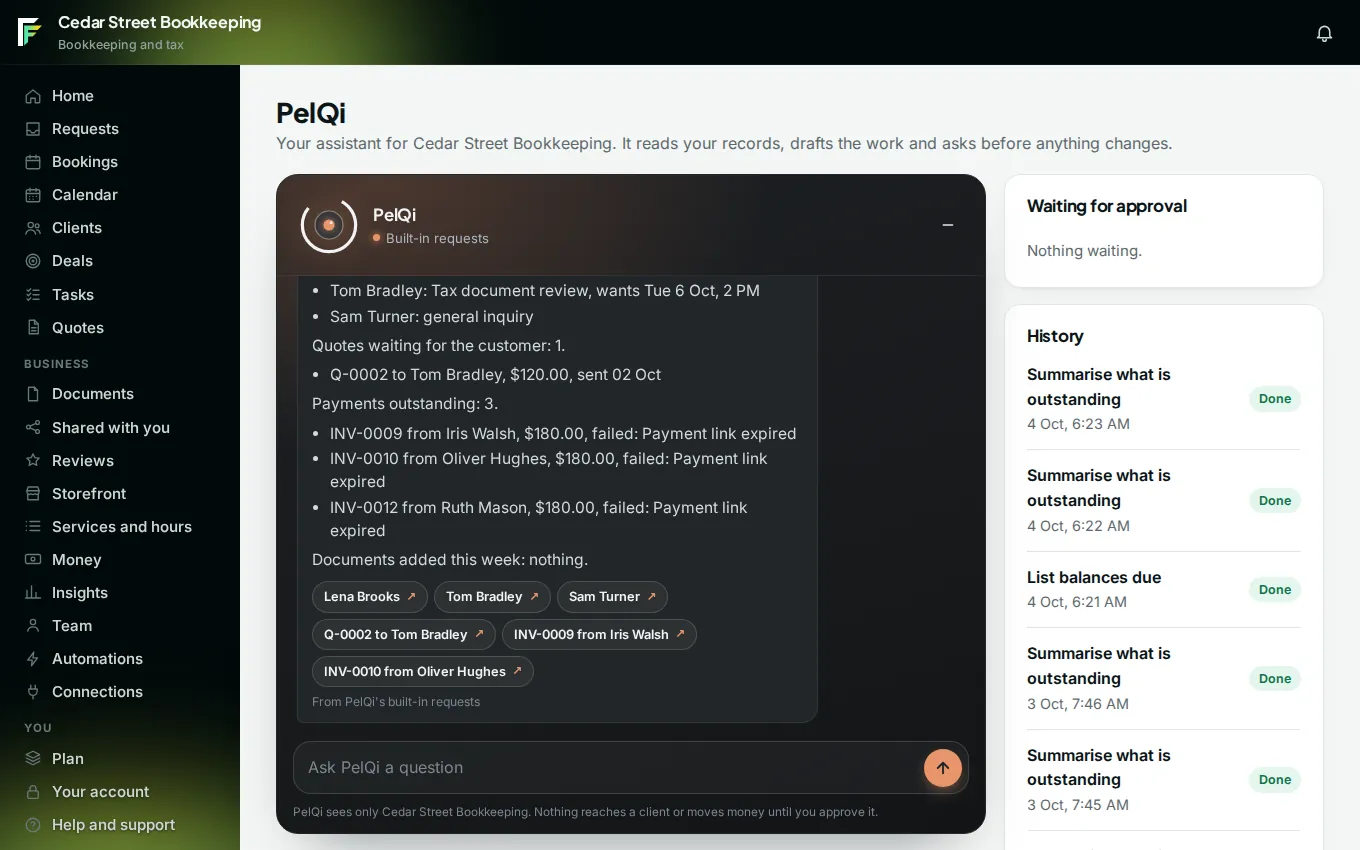
- Type your question in the box that says Ask PelQi a question, then choose the send arrow.
- Read the answer. Under it, PelQi shows links to the records it used, such as a booking or a quote. Choose one to open it.
- If PelQi prepared something that needs your say, the answer shows Waiting for your approval. Choose Review to look at it before anything happens.
- To close the chat, choose the minimise button. Your conversation is still there next time you open it, on any page.
What it can and cannot do
- Look things up. Clients, bookings between two dates, quotes, invoices, income and expenses, your services and prices, tasks, and, on Growth, deals and the pipeline.
- Write drafts. A draft client record, a draft quote that is not sent, or a follow-up message. Nothing reaches a client from a draft.
- Propose changes. Emailing a client, confirming a booking or cancelling one. Each waits for a person to approve it. See What PelQi asks before doing.
- Not refunds or prices. Refunds and price changes stay with people, in the app.
- Only your workspace. PelQi cannot see other businesses, and it only sees what your role can see.
PelQi can make mistakes. Check its work before you rely on it, especially amounts and dates.
What you should see
An answer in a few short sentences or a short list, with links to the records it used. The header under PelQi's name says Reads only this workspace when it is answering in your own words.
When PelQi cannot answer in your own words just then, it answers from its built-in requests instead and labels the answer From PelQi's built-in requests. These are fixed questions such as What needs my attention?, Any booking conflicts coming up? and Prepare follow-ups for requests I have not answered. They always work and do not count towards your questions.
On Starter you need to confirm your email address before PelQi answers in your own words.
If it does not work
- "Confirm your email address to ask PelQi questions in your own words." Open the link in the email Fountain sent when you signed up, or send it again from Your account. See Confirm your email address.
- "PelQi has answered the 15 questions a month that Starter includes." You have used Starter's questions for now. More come back as each one turns 30 days old. See PelQi's questions on Starter and Growth.
- The header says "Built-in requests only in this workspace". Health and care workspaces keep their records inside Fountain, so PelQi only answers its built-in requests there. See Health and care businesses.
- You cannot find Ask PelQi. Check you are signed in to the workspace. Every role can use PelQi; if it is still missing, refresh the page.
Still stuck? Contact Fortis support and a person replies by email.