
Find your way around Connections
Updated 21 October 2026
Connections is where Fountain meets the apps you already use: your calendar, email, meetings, payments, books, and the booking app you are moving from. Everyone in the workspace can open it. Some apps belong to each person, and the rest are connected once by the workspace owner.
Availability Every plan: Starter and Growth. Some apps need Growth.
Steps
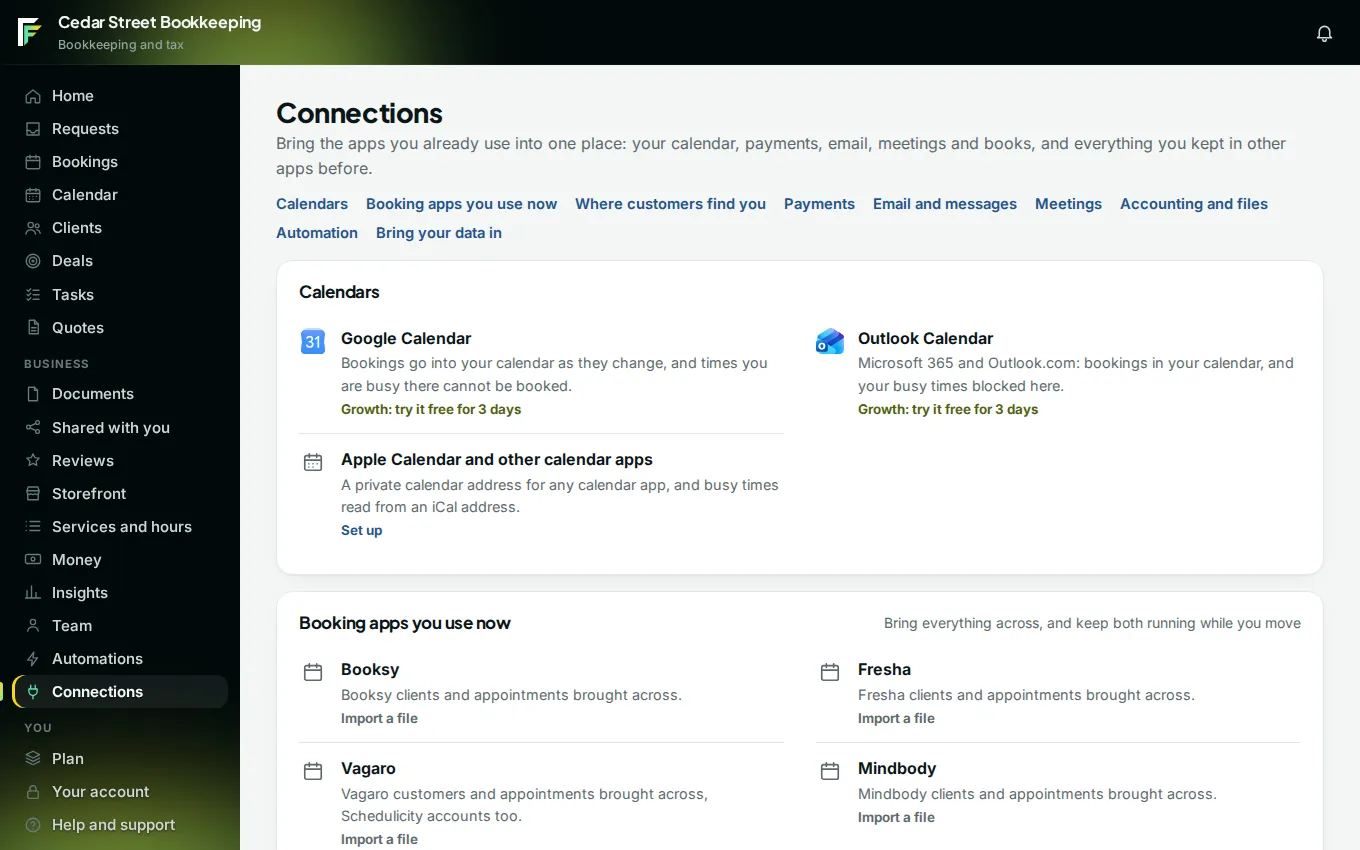
- Choose Connections in the menu. On a phone, it is under More.
- Use the links at the top to jump to a group: Calendars, Booking apps you use now, Where customers find you, Payments, Email and messages, Meetings, Accounting and files, Automation and Bring your data in.
- Read the state under each app's name to see where it stands (the table below explains each one).
- Choose an app to open its own page. It shows what the app does once connected, How to set it up, and its settings.
What it can and cannot do
- Every plan gets the whole catalogue, every importer, Gmail and Outlook mail, Google Meet, Microsoft Teams and Zoom links, imports from Square Appointments, Acuity and Calendly, WhatsApp chat links and busy times from one iCal calendar for the workspace.
- Copies in Google Drive, and booking apps blocking your times and adding new bookings, are part of Growth.
- Growth adds two-way Google Calendar and Outlook Calendar, up to three iCal calendars for each person, the private calendar address, Zapier and Make, Slack, and Square, PayPal and QuickBooks sync.
- Your own calendar is yours: each team member connects their own. Everything else (the sending mailbox, the meeting app, Drive, Square, PayPal, QuickBooks, Slack, webhooks) is connected once by the owner for the whole workspace.
- As of 18 October 2026, Zoom, Slack, Square, PayPal, QuickBooks Online, Square Appointments and Acuity Scheduling show Needs setup by Fortis or Import a file, because Fortis is still registering Fountain with them. Their pages say so, and offer what works today instead.
- Fountain connects through each app's public interface. Fortis is not a partner of, or endorsed by, any of them.
Growth is $49 a month or $468 a year, with a free three-day trial. See Starter and Growth.
What you should see
A page of groups, each with its apps. At the bottom of Bring your data in, your most recent imports are listed so you can get back to them.
What the states mean
| State | What it means |
|---|---|
| Connect | Ready to connect. Open the app and choose its Connect button. |
| Connected | Working. The account it uses is shown next to it. |
| Needs attention | The other app stopped accepting Fountain's access. Open it and choose Connect again. |
| Owner connects | This app is set up once for the whole workspace, by the owner. |
| Growth | Part of the Growth plan. If you can still start the free trial, it says so. |
| Needs setup by Fortis | Fortis has not finished registering Fountain with that app yet, so it cannot be connected today. |
| Import a file | Bring records in from a file you export from the other app. No sign-in to that app is needed. |
| On, Set up, Ready | Built into Fountain, such as Stripe, other ways to pay, WhatsApp links, CSV downloads and the form for your website. |
| Link ready, Publish your page first | A booking link for Google, Facebook, Instagram, Apple Maps or TikTok. It works once your page is published. |
| Off for health and care | Switched off in health and care workspaces, because it would send client details out of Fountain. |
If it does not work
- An app says Growth. It is part of the Growth plan. See "This needs Growth".
- An app says Owner connects. Ask your workspace owner. Managers and staff cannot connect workspace apps.
- An app says Needs attention. See A connection needs reconnecting.
- The banner says calendar sync is off for health and care workspaces. That is by design: no appointments or client details leave Fountain. Importing still works.
Still stuck? Contact Fortis support and a person replies by email.