
Find your way around Money
Updated 18 October 2026
Money is a simple record of what came in and what went out. Paid invoices are added on their own; you add expenses and any other money as it happens. Owners and managers can open it.
Availability Every plan. Owners and managers.
Steps
- Open Money in the menu.
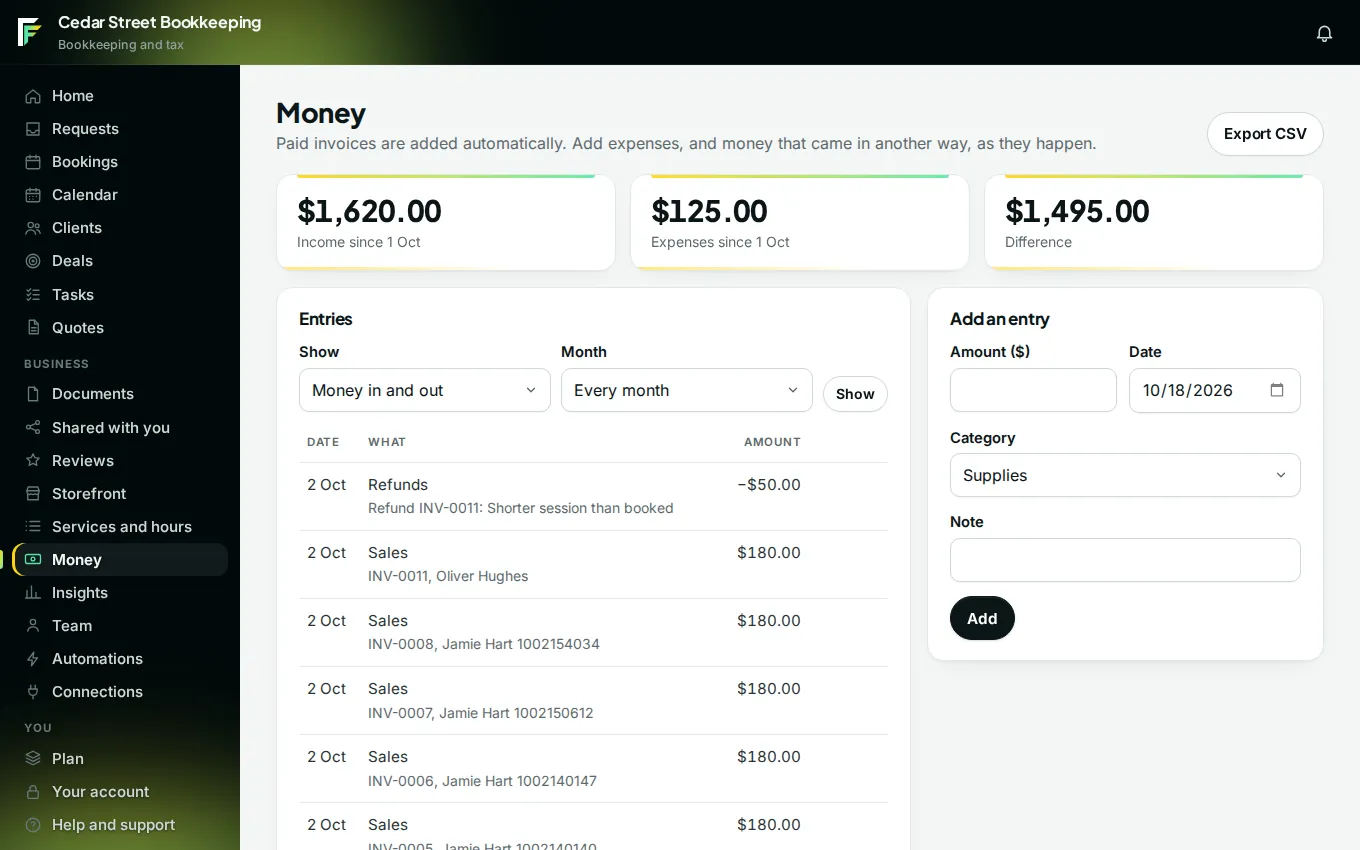
- Read the three figures at the top: income since the first of this month, expenses since the first of this month, and the Difference.
- To narrow the list of Entries, choose Money in or Money out under Show, pick a Month, and choose Show. Choose Clear to see everything again.
- To add something Fountain did not see, use Add an entry. See Add expenses and other income.
What it can and cannot do
- Card and bank payments are added on their own once Stripe confirms them, and refunds are added as money out.
- Money shows what has been paid, not what is still owed. Open balances and waiting payments are on Home.
- The figures at the top cover this month, from the first to today.
- Staff cannot open Money. Only the owner sees the sections for Stripe and the other ways to pay.
What you should see
Each entry shows its date, category, note and amount. Payments from customers appear under Sales, with the invoice number and the customer's name, and the method when you recorded it yourself. Refunds appear as money out under Refunds. With a filter on, a line above the list gives the totals for what is shown.
The owner also sees Card and bank payments, to connect Stripe, and Other ways customers can pay you.
What customers still owe
Money shows what has been paid. To see what is still to come, open Home: Not paid yet lists payment links that are waiting, processing or failed, and Balances due lists open balances with their due dates. Each quote shows its own invoices and whether they are paid.
If it does not work
- A payment is missing. Card payments are added once Stripe confirms them, and bank payments once they clear. Payments made another way are added when you record them on the quote.
- "Payments and refunds follow the money that really moved, so they cannot be removed here." Only entries someone typed in can be removed. To return a payment, refund it.
- Money is not in your menu. Staff cannot see Money. Ask the owner.
Still stuck? Contact Fortis support and a person replies by email.